
AI APP AI Center
As a rule, resident registration numbers are not collected. The global payment screen does not use Korean tax input fields.
The overseas AI APP usage fee is USD 2 per month.
An email notice will be sent 7 days before expiration.
AI APP Homepage
If login is established within 1 month after homepage payment, the first download is available once, and up to 2 downloads are allowed including 1 re-download.
App Settings and Key Registration
- App Settings
- Running AIAPP means that the user agrees to grant permissions required for app execution, including AI account, microphone, notifications, and network.
Download: the AIAPP installation file is saved in My Files → Downloads.
Tap the installation file to install it, and an AIAPP icon will be created on the mobile home screen or app list.
Tap the AIAPP icon to open the login and payment screen.
Run after login and payment.
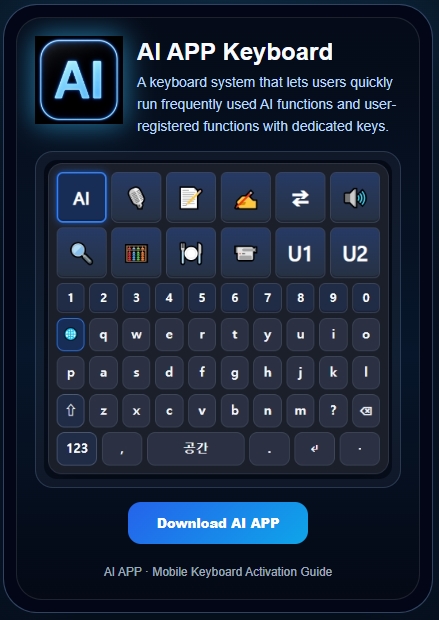
- Press the 🌐 key to select a language.
On the mobile screen, tap "Settings".
In the "General" window, tap "Default keyboard and additional keyboard settings".
Turn on "AIAPP Keyboard".
Tap "Default keyboard" above and enter/select "AIAPP Keyboard".
In the "General" window, tap "Keyboard".
- AI In the "Keyboard" window, tap "Add New Keyboard".
- Select "AIAPP Keyboard".
Tap "AIAPP Keyboard" and turn on "Allow Full Access".
- Key Registration
| Long-press a key to register it. Short-press it to call and run the function key. | Register 📹(CCTV Check), U1(User registration type 1), and U2(User registration type 2). (They may be registered later.) | Key | Registration Item |
|---|---|---|---|
| 📹 | Account or access information | ||
| U1 | Save | ||
| U2 | Delete All |
| Symbol | Category code | Service item | Service type | Service overview |
|---|---|---|---|---|
| AI | AI | Instant AI Call | AI type | Calls AI immediately to create, improve, summarize, or expand the input sentence. |
| 🎙 | ST | Speech to Text | AI type | Converts speech into text or listens to an audio file and saves it as input text. |
| 📝 | TR | Record Creation | AI type | Organizes meetings, conversations, consultations, or calls into records in time order. |
| ✍️ | WA | Sentence Writing | AI type | Writes a sentence or improves an existing sentence. |
| ⇄ | TL | Translation | AI type | Translates entered or selected text into a natural sentence in another language. |
| 🔊 | IN | Interpretation | AI type | Converts a conversation with the other party into another language in real time to support communication. |
| 🔍 | FS | AI Search | AI type | Runs AI search based on a question or input word and compares and organizes the results. |
| 🧮 | CM | Calculation | AI type | Runs formula input, ordinary calculations, or daily-life calculations. |
| 🍽 | FM | Food Recommendation | AI type | Recommends food choices. |
| 📹 | CC | CCTV Check | Information registration type | The user registers a CCTV app, execution path, web address, or access information to check the screen. |
| U1 | U1 | User Registration Type 1 | Information registration type | The user registers an execution path, app, web address, document, contact, or function for direct use. |
| U2 | U2 | User Registration Type 2 | Information registration type | The user registers an execution path, app, web address, document, contact, or function for direct use. |